PUBLIC DOCS TEARDOWN 03AI UNDERSTANDING + CONVERSION PATHWAYS
Wisepops has the answers.
The product story is still fragmented.
Wisepops already has deep documentation across popups, bars, embeds, onsite feed, web push, targeting, analytics, integrations, AI recommendations, and cart recovery.
The knowledge exists.
The opportunity is to connect it into one clearer product model and create stronger next steps from the pages closest to product intent.
More answers do not automatically create more understanding.
A user can find the setup article.
A search engine can index the page.
An AI system can retrieve pieces of information.
But the product is easier to understand when the relationship between those pieces is explicit.
Wisepops is one platform.
The documentation should make that clear.
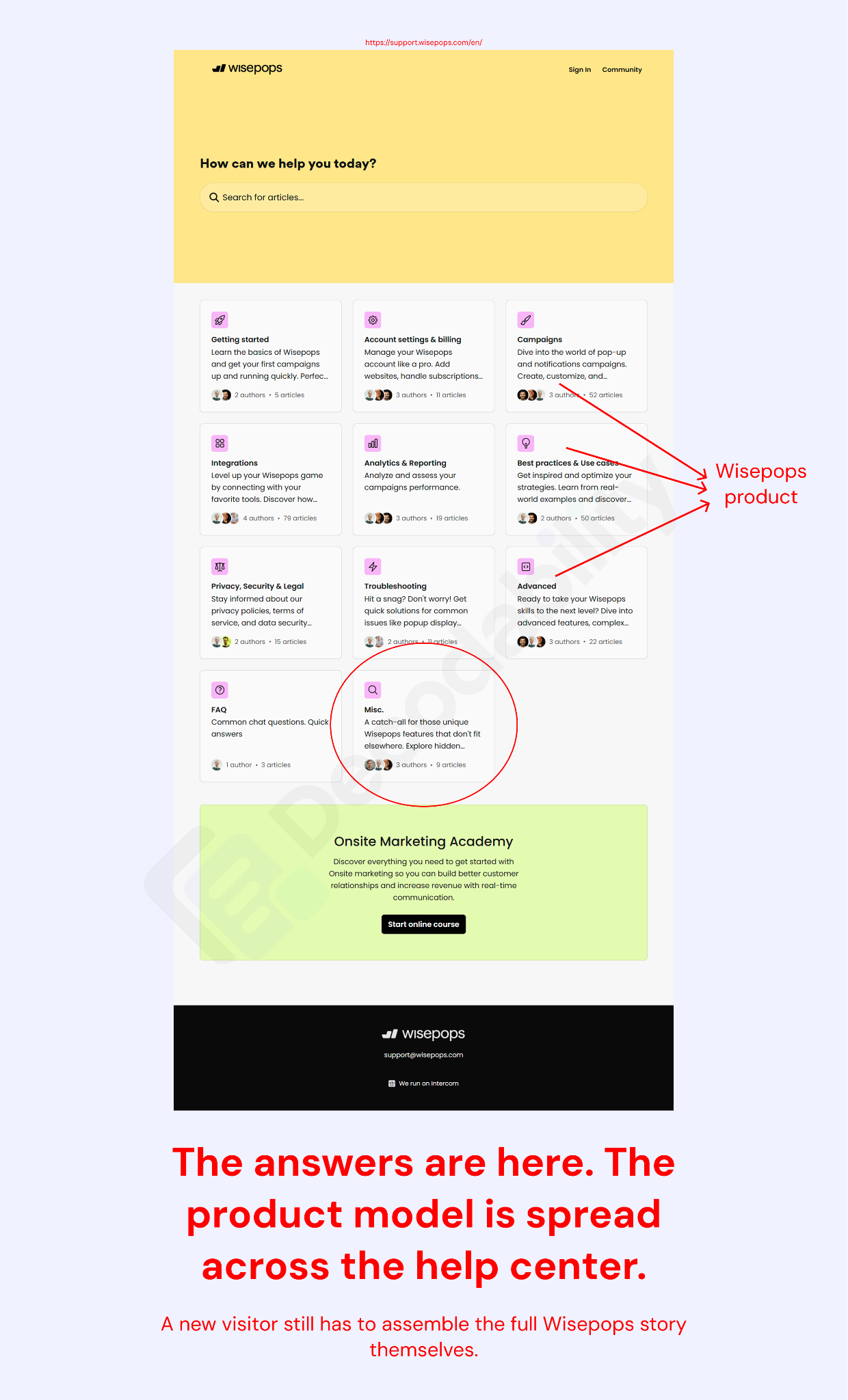
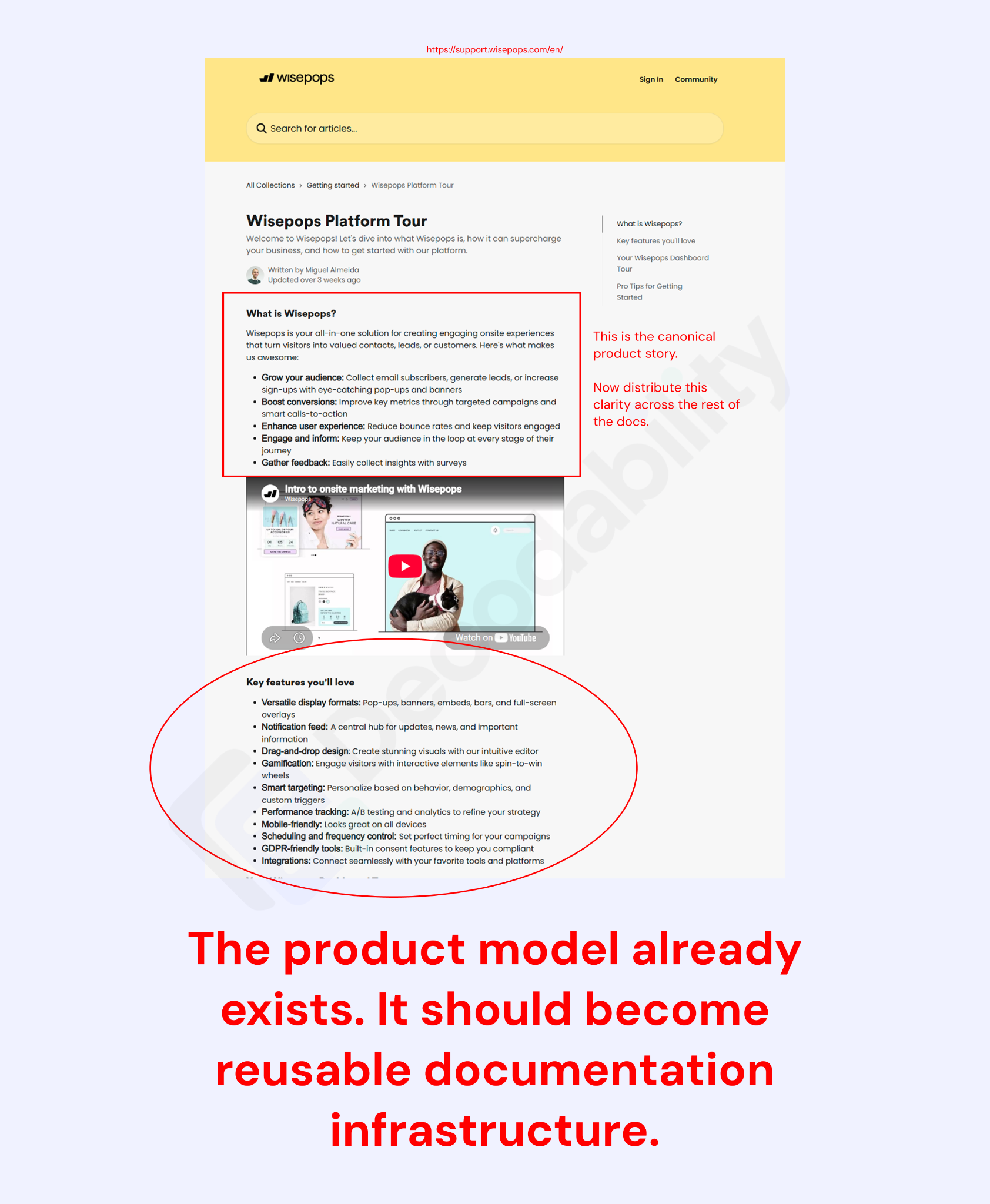
The product model already exists.
The Platform Tour explains what Wisepops is at a broader level.
That is valuable.
It gives the product one place where the pieces come together.
The next step is to carry that clarity into the rest of the documentation.
A feature page should not only explain the feature.
It should make clear where that feature sits inside Wisepops.
Create one canonical product map.
HOW WISEPOPS WORKS
Wisepops is an onsite marketing and conversion platform for creating targeted experiences across popups, bars, embeds, onsite notifications, web push, and AI-powered ecommerce campaigns.
CAMPAIGN FORMATS
- Popups
- Bars
- Embeds
- Onsite Feed
- Web Push
TARGETING + PERSONALIZATION
- Audiences
- Custom properties
- Custom events
- Behavioral targeting
INTEGRATIONS
- Shopify
- Klaviyo
- Analytics tools
- Marketing stack
MEASUREMENT + EXPERIMENTATION
- Goals
- Analytics
- A/B testing
- Revenue measurement
AI E-COMMERCE
- Product recommendations
- Cart recovery
- Personalized product experiences
Now every feature has a place inside the same system.
Answer important product questions directly.
- Does Wisepops work with Shopify?
- Can Wisepops sync leads to Klaviyo?
- Does Wisepops support exit-intent popups?
- Can Wisepops recover abandoned carts?
- What is the Wisepops Onsite Feed?
- Does Wisepops support web push?
- Can Wisepops show product recommendations?
- Can Wisepops target returning visitors?
- Does Wisepops support A/B testing?
- Can Wisepops track campaign revenue?
The ideal source page should answer the question immediately—a useful foundation for Answer Engine Optimization (AEO).
Then give enough context to understand:
- What the capability is.
- How it relates to Wisepops.
- Who it is for.
- What the requirements are.
- How to set it up.
- What the next related action is.
One clear answer path is stronger than forcing the reader to combine several unrelated support pages.
Add a reusable product-understanding block.
For major features and integrations:
WHAT IT IS
A clear one-sentence definition.
BEST FOR
The jobs this capability solves.
WORKS WITH
The related Wisepops features and integrations.
USE IT WHEN
The situation where the feature becomes useful.
RELATED
The next documentation pages to explore.
For Onsite Feed:
WHAT IT IS
A persistent onsite notification center visitors can open without interrupting their browsing experience.
BEST FOR
Product launches, restocks, offers, content, and returning-visitor messaging.
WORKS WITH
Targeting, analytics, popups, Klaviyo, and custom events.
USE IT WHEN
A message should stay available without showing another modal.
The tutorial stays technical.
The context becomes much clearer.
Terminology should not require interpretation.
- Onsite Feed.
- Notification feed.
- Notifications.
- Web push.
- Campaigns.
- Formats.
- Goals.
- Analytics.
- Custom properties.
- Custom events.
- AI recommendations.
- AI cart recovery.
Where concepts overlap, define the relationship once.
Then reuse the same terminology throughout the documentation.
Clear product language helps users.
It also gives search engines and AI systems a more consistent model of what Wisepops does.
Shopify is already a buying-intent page.
“Add Wisepops to your Shopify website” looks like an implementation article.
It is also a compatibility page.
Someone arriving there may be asking:
Does Wisepops work with Shopify?
The current page answers the setup.
The stronger version also explains what connecting Shopify unlocks.
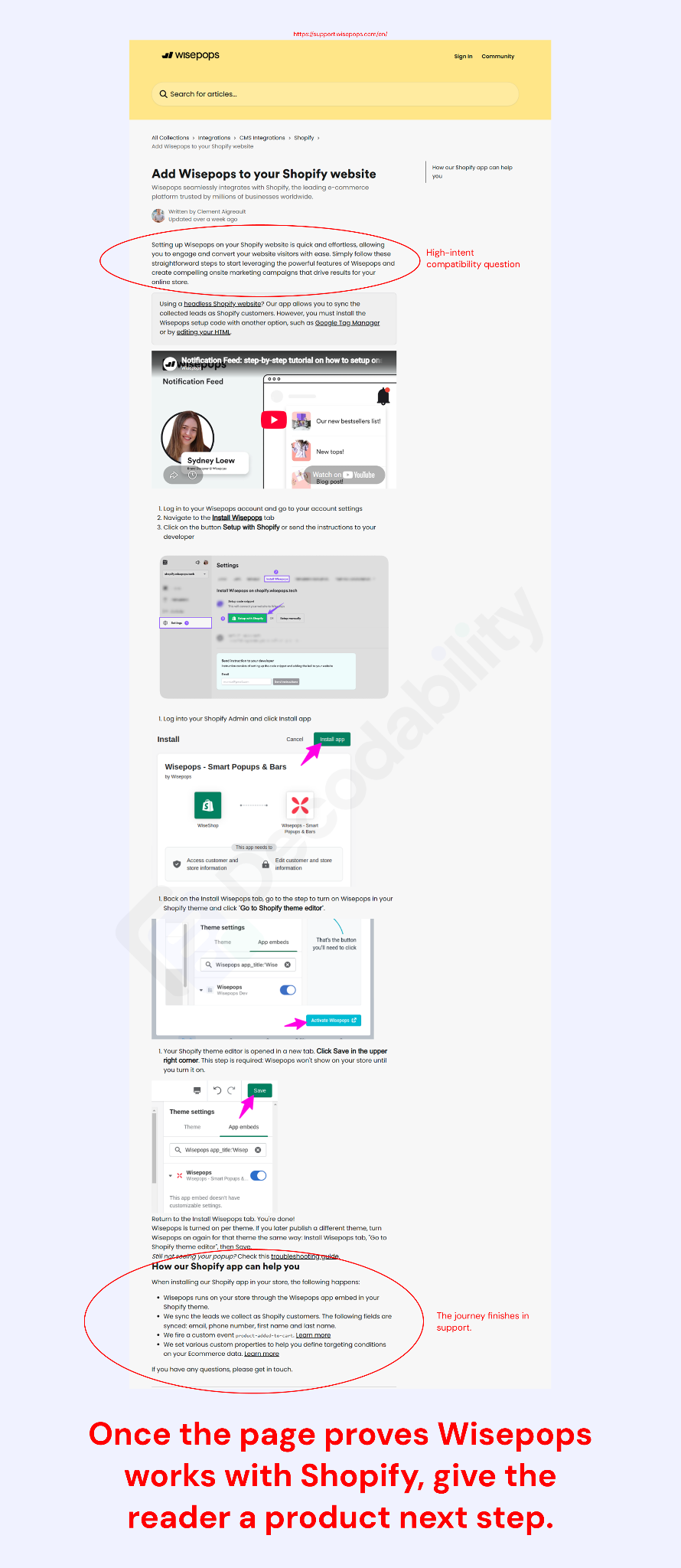
A stronger Shopify page starts with the outcome.
WISEPOPS + SHOPIFY
Launch targeted onsite campaigns on Shopify without adding campaign code manually.
The Wisepops Shopify app connects the store to the campaign builder so teams can run popups, bars, embeds, onsite notifications, web push, targeting, and ecommerce campaigns from one platform.
ONCE CONNECTED
- Run Wisepops through the Shopify app embed.
- Use Shopify data for targeting.
- Build campaigns around product and cart behavior.
- Sync captured leads into the marketing stack.
- Connect leads to tools such as Klaviyo.
Then show the installation steps.
After setup:
WHAT CAN YOU DO NEXT?
- Launch a welcome offer.
- Grow email or SMS lists.
- Recover abandoning shoppers.
- Target returning customers.
- Show product recommendations.
- Test campaign variants.
Support remains intact.
Product understanding gets stronger.
The CTA should match the answer.
For a prospect:
Ready to use Wisepops on Shopify?
Start a free trial and connect the store.
For an existing customer:
Enable the Wisepops app embed in Shopify.
One page.
Two relevant paths.
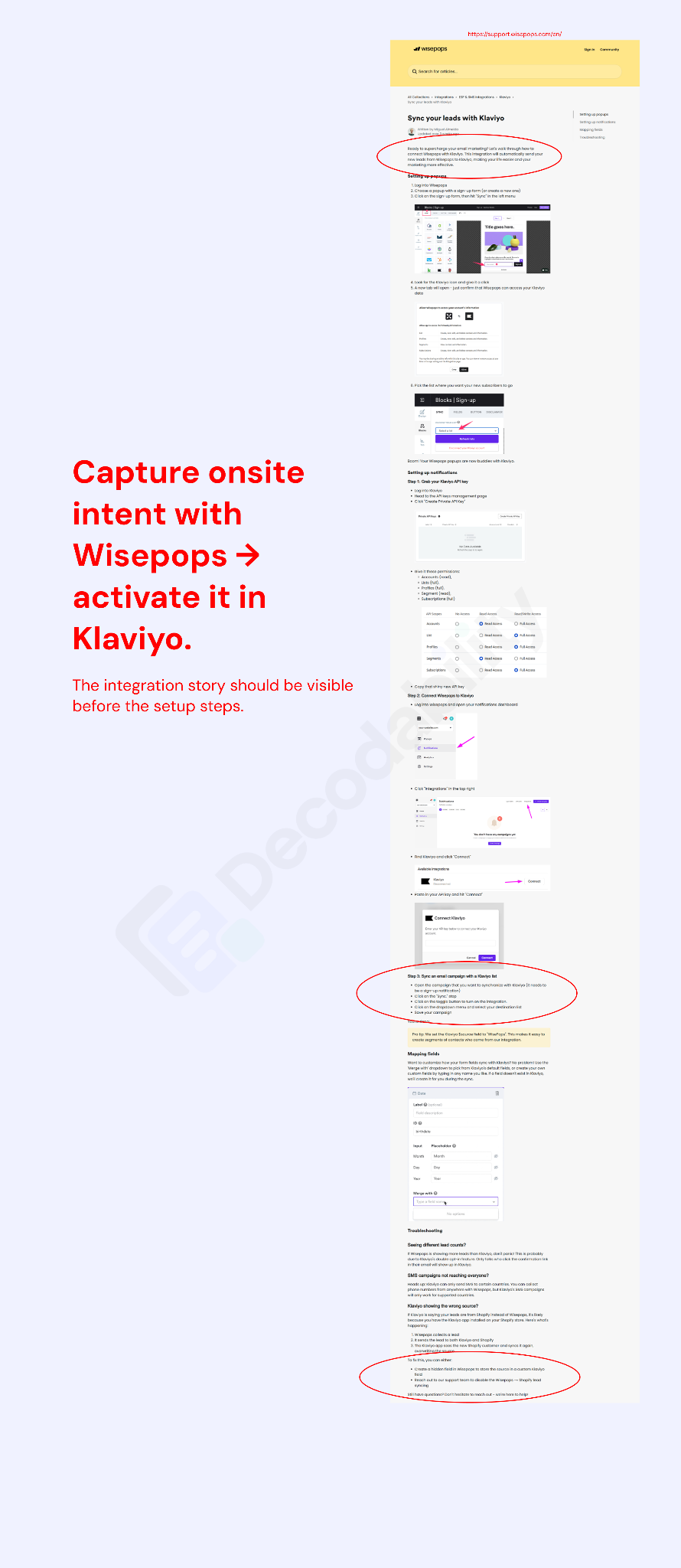
Klaviyo has the same opportunity.
The setup is useful.
The product relationship can be clearer.
Wisepops captures onsite intent.
Klaviyo activates that data through email, SMS, segmentation, and lifecycle messaging.
That relationship should be visible before the configuration.
WISEPOPS + KLAVIYO
Capture onsite leads with Wisepops and activate them in Klaviyo.
Then answer:
- What syncs?
- When is the integration useful?
- Which campaigns can feed Klaviyo?
- How are fields mapped?
- What happens when a contact already exists?
- Which ecommerce workflows does this support?
- How is the connection troubleshooted?
Then move into setup.
Why.
Relationship.
Implementation.
Next step.
Connect use cases to setup.
And setup back to use cases.
Wisepops already has a dedicated Best practices & Use cases collection.
That is a strong starting point.
The opportunity is to make those pages operational.
- Cart recovery
- Targeting
- Shopify
- Campaign setup
- Analytics
- List growth
- Campaign format
- Form setup
- Klaviyo
- Measurement
- Returning-visitor personalization
- Custom properties
- Events
- Targeting
- Analytics
The relationship should also work in reverse.
A custom-properties article should point to personalization use cases.
An analytics article should point to experiment and revenue use cases.
A Shopify article should point to ecommerce campaigns.
Why → How.
How → Why.
Conversion paths should follow intent.
Not every help article needs a trial CTA.
The next step should depend on the page.
GETTING STARTED
Start free trial
Platform tour
SHOPIFY
Install / Start trial
Shopify use cases
KLAVIYO
Connect Klaviyo
Lifecycle use cases
USE CASES
Build this campaign
Browse templates
ADVANCED
Open the relevant setting
Technical support
ANALYTICS
Set up goal tracking
Measurement guides
TROUBLESHOOTING
Fix the issue
Related support
The CTA should feel like part of the answer.
Not an ad placed below it.
Internal links should teach the platform.
- Shopify
- Ecommerce use cases
- Cart recovery
- Recommendations
- Measurement
- Klaviyo
- List growth
- Forms
- Segmentation
- Personalization
- Onsite Feed
- Returning visitors
- Launches
- Web push
- Analytics
- Custom properties
- Targeting
- Personalization
- Use cases
- Analytics
- Goals
- A/B testing
- Revenue measurement
The documentation starts behaving like one connected product system.
Start with three pages.
How Wisepops Works
Create the canonical product map.
Shopify
Turn compatibility into product understanding + setup + next step.
Klaviyo
Explain the full workflow before the configuration.
Then apply the same system to the highest-intent feature and integration pages.
The opportunity
Wisepops already has deep public product knowledge.
The stronger system makes that knowledge easier to decode.
- One product model.
- Clear terminology.
- Direct answers.
- Connected use cases.
- Better internal paths.
- Relevant next steps.
- Clearer for users.
- Clearer for Google.
- Clearer for AI systems.
- Better connected to product adoption.




Built for humans.
Decodable by machines.
Decodability rebuilds existing documentation for marketing and e-commerce software companies so product knowledge is easier to discover, understand, and act on.